
Schrödinger’s PDF: same hash, two different contents

In digital forensics, PDF forensics deals with the acquisition and technical analysis of PDF documents: internal structure, images, metadata, revisions, potential manipulation and digital signatures. Examining graphically represented signatures also requires distinguishing what the document contains from what is displayed on screen.
There are cases in which this analysis becomes more complex because of differences in interpretation or rendering, arising from the document structure, the software used or their interaction. Such differences can also be exploited intentionally by whoever creates the PDF.
We encountered a PDF in which some images did not appear in Preview on macOS, although they were visible in other software. Grey boxes appeared in place of some photographs; when opened in other viewers, the same document displayed the images.
The investigation began with the cover images: before considering them missing or damaged, we checked that they were actually present in the PDF objects.
Through a series of progressively reduced tests, we were able to narrow down a behavioural difference to the handling of particular JPEG 2000 images whose File Type Box fields declare the JPX format. This declaration must be distinguished from full compliance of the container with the standard.
The result is particularly interesting: we created two PDFs that differ by only two bytes across the entire file, with the same JPEG 2000 codestream. In the test performed with PDFKit on macOS, one variant displays the image and the other produces a blank page.
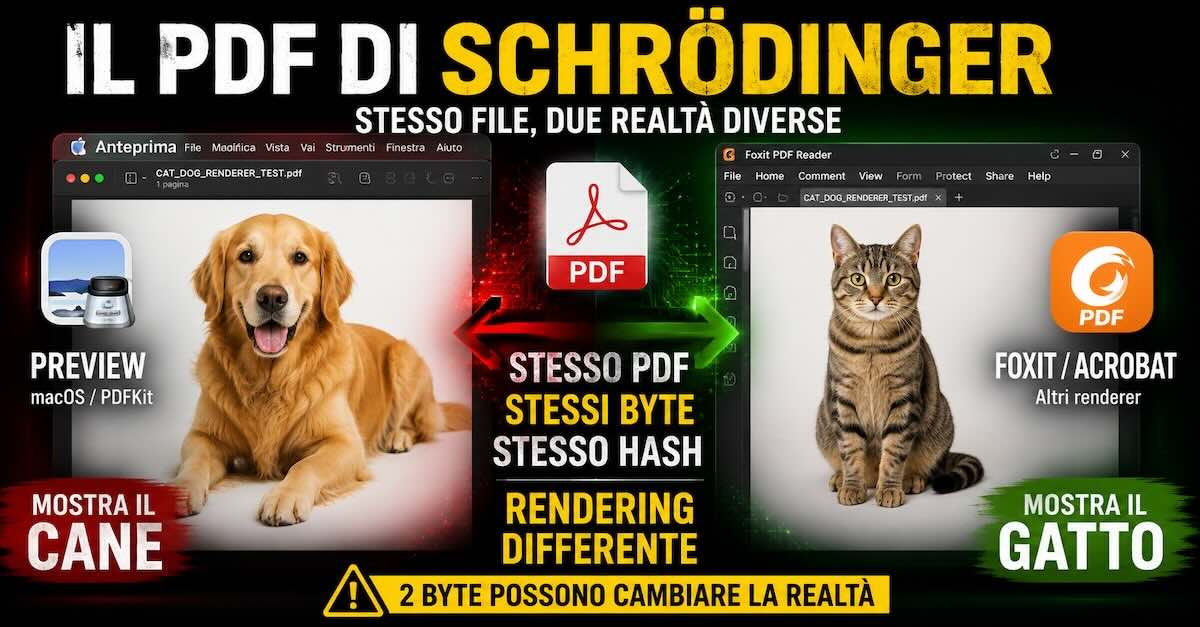
We then used the rendering difference to build a second experiment: a single PDF that displays a dog with one renderer and a cat with another. The file does not change; its visual representation does.
The PDF structure and the images it contains
To understand the problem, we first need to distinguish the PDF document from the way it is displayed.
A PDF is a structured container that can include text, fonts, vector graphics, raster images, transparency, colour profiles, masks, layers and many other objects. When we open the document, we are not necessarily seeing something that has already been “drawn”: the PDF renderer interprets those objects and converts them into the pixels shown on the display.
Different applications may use different engines, while separate applications may also share the same engine. Preview and other Apple applications use the system’s PDF technologies; other viewers use different implementations. Even in a browser, the result depends on the component that opens the PDF: describing a test therefore requires the application, version and method of opening, as well as the operating system.
A document that one renderer can read may therefore expose a limitation, an error or different input handling in another. However, the fact that software displays the image does not, on its own, prove that the entire document complies with the specifications.
The “missing” images were still inside the PDF
In the original document, the Image XObjects for the photographs were present, with apparently consistent dimensions and streams. Other viewers could decode and display them: their absence from the screen did not mean that the data was absent from the PDF.
The six problematic cover images shared one characteristic:
JPEG 2000 + CMYK + PDF filter /JPXDecode.
The /JPXDecode filter, introduced in PDF 1.5, is the mechanism provided for decoding JPEG 2000 images. Its name does not mean that every stream must have the jpx brand: the same filter is also used for images with a JP2 container. The specification also governs the relationship between the colour information within the image and that in the Image XObject.
The presence of /JPXDecode, therefore, is not an error in itself.
The JP2 and JPX formats
JPEG 2000 encompasses a family of specifications. Part 1 defines the core coding system and the JP2 format; Part 2 introduces coding extensions and the JPX format, with additional features for colour description, multiple codestreams and image composition. It is essential to distinguish the compressed codestream from the container that encloses it.
A JP2 container is organised into boxes. The outline below describes the four top-level boxes also present in the test case streams; it is not a complete description of the requirements for a compliant JPX. A JPEG 2000 codestream without a container, by contrast, does not have this box structure:
JPEG2000 Signature Box
File Type Box       (ftyp)
JPEG2000 Header     (jp2h)
Codestream          (jp2c)
The File Type Box (ftyp) contains a major brand, a minor version value and a compatibility list. In our analysis, we compared the declaration:
brand = "jpx "with:
brand = "jp2 "Analysing the JPEG 2000 codestream
To distinguish the properties of the images from those of the container, we examined the codestream markers. It is important to separate the images in the original document from the synthetic test case distributed here: they are not the same dataset.
In the two final test case PDFs, the image is 512 × 512 pixels, with four 8-bit components, no subsampling, and CMYK colour declared in the PDF and in the colr box. The codestream uses LRCP progression order, a single quality layer, MCT=0, five decomposition levels, 64 × 64 code-blocks and a reversible 5/3 transform, with quantisation style 0, without quantisation. These parameters describe the attached pair, not necessarily the photographs in the initial document.
The final pair contains the following markers, among others:
SOC
SIZ
COD
QCD
SOT
SOD
EOC
The COM comment marker, which was present in an earlier version and identified the encoding software, was removed from both final PDFs. This cleanup is common to both files and does not alter the compressed image sample data.
In preliminary tests, converting the image to conventional JPEG while retaining DeviceCMYK allowed it to be displayed in Preview. This rules out a general inability to display CMYK images, but does not rule out a specific interaction between CMYK, JPEG 2000 and the decoding path used.
The tests performed to isolate the problem
The initial tests included re-encoding and conversions, including JPEG/DCT in CMYK and RGB, which allowed the images to be displayed. These checks are useful for finding alternatives, but they change multiple variables and are not sufficient to identify which field determines the behaviour.
The more controlled comparison instead consists of keeping the JPEG 2000 codestream identical and changing only two bytes in the ftyp. Using PDFKit’s PDFPage.thumbnail on macOS 26.6.2, build 25G83, with the final pair, we obtained:
BR="jpx ", CLi="jpx " + stesso codestream → PDFKit: pagina bianca

BR="jp2 ", CLi="jp2 " + stesso codestream → PDFKit: immagine visibile
In the two final containers, the rreq (Reader Requirements) box is absent in both variants. The presence or absence of this box therefore does not constitute a difference between GOOD and BAD. However, the absence of rreq is relevant when assessing JPX compliance.
The byte-by-byte comparison and controlled tests allow the change in result to be associated with the ftyp in these inputs. On their own, they do not allow us to reconstruct the internal path taken by Apple’s decoder.
Two PDFs with only two bytes of difference
The final pair was reduced to the structures required for the test, removing the C2PA manifests and the codestream comment. The comparison concerns the two resulting PDFs, each 192.196 bytes long.
Both:
- have a single page;
- contain a single image;
- are 192.196 bytes each;
- use
/JPXDecode; - use DeviceCMYK;
- contain the same codestream in the
jp2cbox; - have an identical PDF structure.
Across the entire PDF, only the bytes at zero-based offsets 506 and 514 change (respectively 0x1FA and 0x202). These are offsets 22 and 30 from the start of the JPEG 2000 stream: the first belongs to the major brand, the second to the sole entry in the compatibility list. The minor version remains zero. The trailing space in the following brands is part of the value.
In the GOOD variant, which the tested PDFKit displays:
brand principale (BR):       "jp2 "
versione minore (MinV):      0
unica compatibilità (CLi):   "jp2 "
In the BAD variant, in which the tested PDFKit does not display the image:
brand principale (BR):       "jpx "
versione minore (MinV):      0
unica compatibilità (CLi):   "jpx "
At the binary level, in each of the two positions, the only change is from:
0x32 "2"to:
0x78 "x"The check was performed directly with PDFKit, through PDFPage.thumbnail, on macOS 26.6.2, build 25G83. This API test must be distinguished from the observations made in the Preview app on the original document:
- JPX_BAD variant → PDFKit produces a blank page.
- JP2_GOOD variant → PDFKit displays the image.
With Poppler 25.06.0, by contrast, both final PDFs display the image: the renderings produced at 512 pixels are identical pixel for pixel. Results from different viewers must always be tied to the versions and files actually tested.
The JPX_BAD variant does not display the image in the PDFKit test described and is available at this link: JPX_BAD.
The JP2_GOOD variant, by contrast, displays the image in the same test but with the correct encoding, and is available at this link: JP2_GOOD.
With these two files, we are not comparing two images re-encoded differently: the JPEG 2000 codestream is identical in GOOD and BAD, but the two PDFs have different hashes because two bytes differ. The expression “same file, same hash” instead refers to the next experiment, in which a single PDF is opened with different renderers.
The SHA-256 hashes of the final pair without descriptive metadata are listed below. They allow you to verify that the downloaded files match those analysed: subsequent processing or the addition of metadata may alter them and invalidate the comparison involving only two bytes.
GOOD — 192196 byte
2270aedfdbc143090f40bb6f063d216de638757b06926e5fd07a236a162f03a2

BAD — 192196 byte
b1a52bdfac9bf5a705207f1a358b237b7eca5dd63c8cbedcd3c67adc29469cfb
The additional test: which of the two bytes changes the result?
We tested all four combinations of the major brand and the sole entry in the compatibility list, modifying copies in memory and leaving the other bytes unchanged, and the check performed with PDFKit on macOS 26.6.2 produced the following result:
BR       CLi      MEDIUM          Cane-Gatto
"jp2 "   "jp2 "   immagine        gatto
"jpx "   "jp2 "   immagine        gatto
"jp2 "   "jpx "   pagina bianca   cane
"jpx "   "jpx "   pagina bianca   cane
For these inputs, on the tested PDFKit, changing only the compatibility list byte is sufficient; changing only the major brand does not produce the difference. The distributed pair differs by two bytes, but two bytes are not the minimum required to obtain the change in display in the controlled experiment. The intermediate combinations are diagnostic variants, not a certification of container compliance.
So is JPX an error, and does it cause a bug?
JPX is a standard format, defined by Part 2 of JPEG 2000. The test case does not prove that JPX is unsuitable for PDFs or that Apple’s renderer can never display it, nor that there is a bug in the PDF rendering system: it demonstrates a behavioural difference for a specific pair of inputs.
The PDF specification, in its section on JPXDecode, also provides for enumerated colour space 12, CMYK, but this requirement must be distinguished from container compliance: in the variant branded jp2 , the colr box declares precisely EnumCS 12, whereas the JP2 specification provides for values 16, 17 and 18 for enumerated colour spaces.
The variant branded jpx also lacks the rreq box, required by the JPX structure described in the T.801 specification: changing the brand alone therefore does not automatically make the container compliant with JP2 or JPX. We can therefore speak of a reproduced rendering difference, and these files alone do not constitute definitive proof of a violation of the standard by Apple.
Establishing the precise cause in the software would require further checks, analysis of the implementation or feedback from the vendor. A comparison between fully compliant files would also be necessary to separate input compliance issues from the different strategies renderers use to handle them.
A test PDF to “identify” the renderer
The same principle described above can be used to build a demonstration PDF with two superimposed messages: the visible text depends on how the upper image is handled, not on actual identification of the software.
In the tests described, the document displays “You are using Apple rendering” when the underlying image remains visible and “You are NOT using Apple rendering” when the upper image is painted. These messages are demonstration labels: they do not certify which engine or operating system is in use.
The mechanism does not require JavaScript, reading the User-Agent or identifying the operating system: it uses the different representation of the JPEG 2000 object. Any renderer with the same behaviour could produce the same message.
This is an interesting demonstration of a more general principle of document analysis: the same set of bytes can produce different visual representations depending on the implementation used to interpret it.
The two language versions of the demonstration PDF are available below: the Italian version is here, while the English version is here.
How to avoid the problem when creating a PDF
Anyone producing PDFs intended for wide distribution should favour compliant structures tested with multiple renderers. The format should be chosen according to the image, colour space, required quality and target applications.
Although this is not a bug, if JPEG 2000 is retained, a container compliant with the features and colour actually used must be generated: JP2 cannot be obtained simply by renaming the brand of a CMYK image. Where compatible with the document’s requirements, JPEG with /DCTDecode is an alternative to consider and test.
The choice must distinguish between codec, container and PDF filter. A filename extension or claimed support for a format is no substitute for checking the final PDF.
In a publishing workflow, it is advisable to check what happens after export from the page layout application, for example by trying to open the PDF with different software and operating systems: in the document initially examined, which prompted this research, the metadata identified Adobe InDesign as Creator and a subsequent service as Producer, fields that provide clues about processing but are not sufficient evidence to attribute the modification of the images to specific software.
Tools for forensic analysis of PDFs and rendering
As an initial check, it is useful to compare the same document using independent renderers. The fact that Preview, or any other individual viewer, does not display an image does not prove that its data is absent from the PDF.
When checking the final pair, we compared PDFKit and Poppler, while additional applications, such as Acrobat or Foxit, can broaden the test matrix, provided that versions and results are recorded rather than inferred from the operating system alone.
For JPEG 2000, OpenJPEG provides tools to examine codestreams and encoding parameters. For example, the codestream parameter documentation distinguishes the identifier for the irreversible 9/7 transform from that for the reversible 5/3 transform. Successful decoding, however, does not amount to full validation of the container.
Binary comparison requires checking both the extracted streams and the entire PDF. Metadata and incremental updates can also introduce differences: in earlier versions of the pair, the C2PA manifests made the statement “only two bytes across the entire file” inaccurate.
For low-level forensic analysis of a PDF, however, the most useful approach often remains to examine directly:
/Image
/Filter /JPXDecode
/ColorSpace
/SMask
and then extract the stream, distinguish which boxes are present and which are absent, and analyse their fields. Relevant boxes include:
jP
ftyp
rreq
jp2h
colr
jp2c
The digital forensic analysis of the PDF must be completed by examining the codestream markers, page resources, drawing order and any transparency groups. rreq, for example, is relevant to JPX compliance but is not present in the final pair.
Beyond the grey box: two images in the same PDF
In the initial document, the symptom was a photograph that was not displayed, with a grey area in its place. In the single-image test case, by contrast, the result verified through PDFKit is a blank page. The next experiment makes the difference even more evident.
The rendering difference can also be used to obtain a much more obvious result, namely to make the same PDF display two completely different images depending on the renderer used.
We created a PDF containing photographs of a dog and a cat. On the sample analysed, we reproduced these results:
- with PDFKit, through
PDFPage.thumbnail, on macOS 26.6.2, the dog appears; - with Poppler 25.06.0, the cat appears.
The mechanism consists of two superimposed images with different encodings. The analysed structure contains no JavaScript or instructions to select content based on the viewer. The data relevant to the experiment is:
Pagina:               700 x 700 punti
Image XObject:        2
Immagine sottostante: cane, JPEG /DCTDecode, RGB
Immagine superiore:   gatto, JPEG 2000 /JPXDecode, CMYK
Brand del gatto:      "jpx "
Ordine di disegno:    cane, poi gatto
You can download “Schrödinger’s PDF” from the following link: the name “Schrodinger’s PDF” is a metaphor, because both images are already present in the file at the same time and the result depends on rendering, not on a modification of the document when it is opened, so the PDF contains a cat and a dog simultaneously.
The following images document the described comparison between Preview and Google Chrome on macOS. The principle of the experiment is to open the same file with different applications: file identity must be verified at the byte level or through hashes, not inferred solely from the name shown in the screenshots.
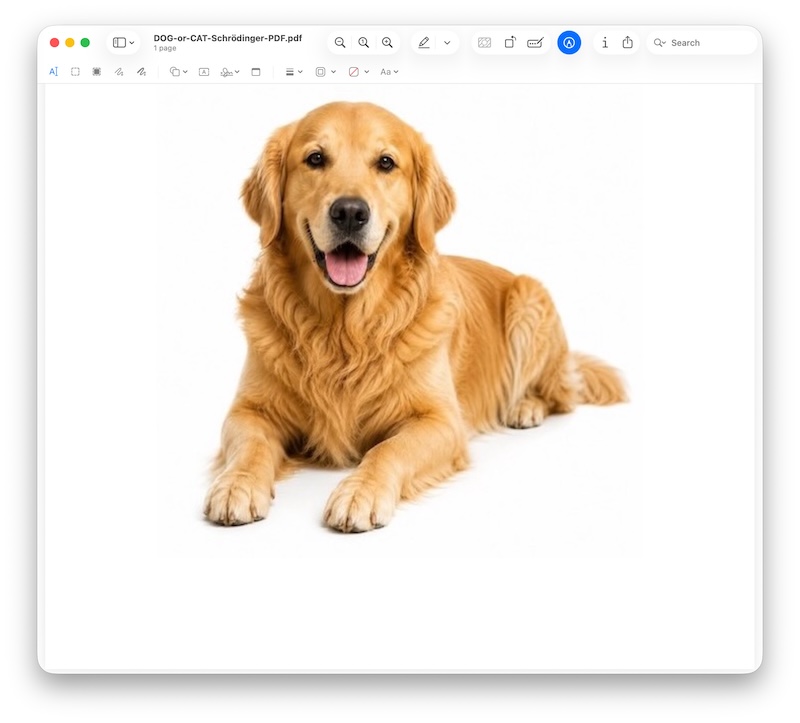
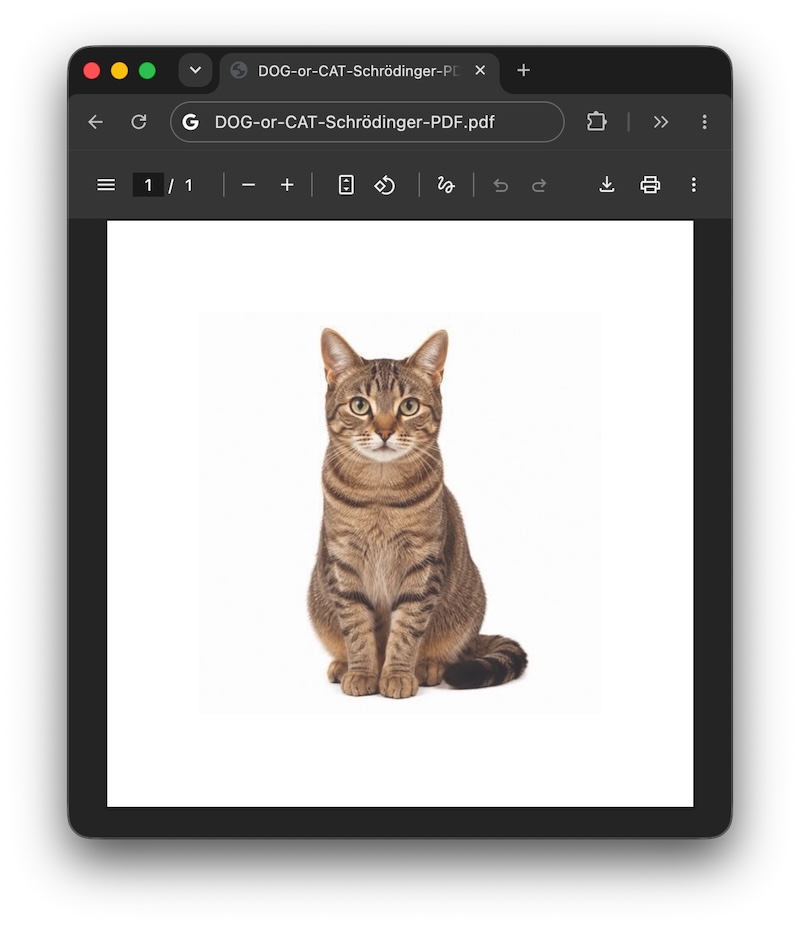
The photographic comparison also includes an Android smartphone on the left and an iPhone on the right: in the applications used for this test, the cat and the dog appear respectively. The photograph documents the visual result; on its own, it neither proves the binary identity of the copies opened nor allows generalisation to all applications on the two systems.
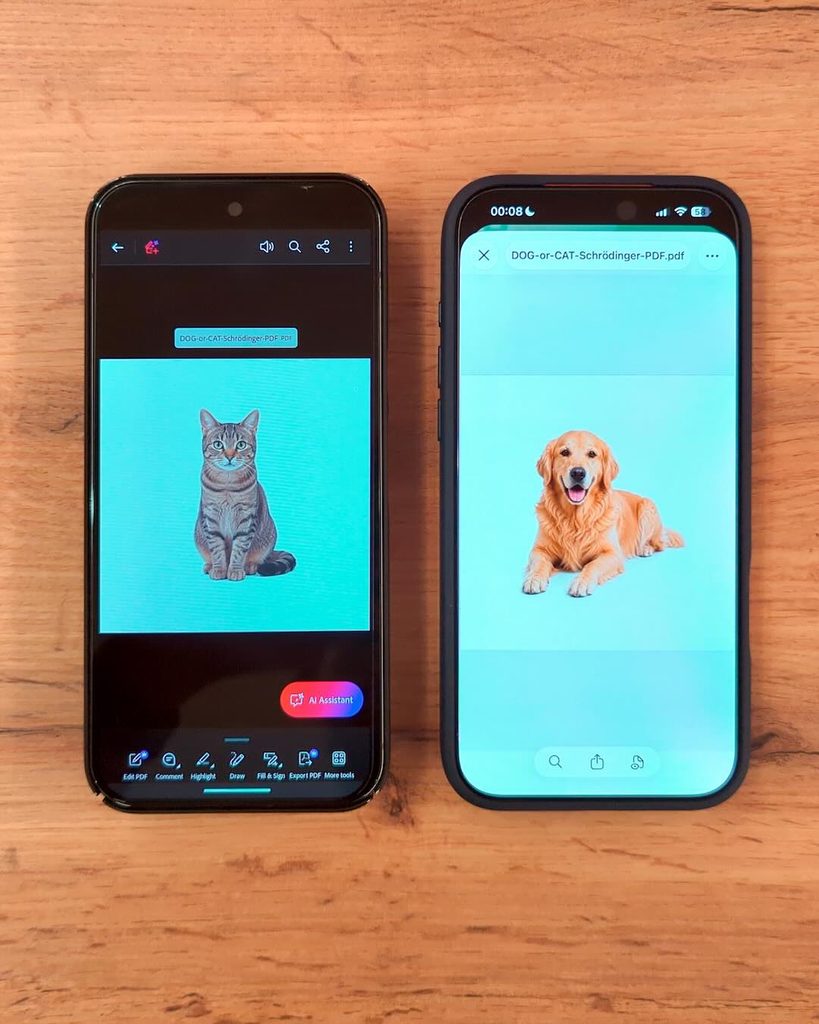
These examples should be read as observations of the tested environments. Windows, Android and iOS are operating systems, not renderers: reproducing the result also requires specifying the application and its version.
How the experiment works
The principle is the one already used in the demonstration PDF containing the messages “You are using Apple rendering” and “You are NOT using Apple rendering”, but this time applied to photographic content.
The document contains both images: the dog is an RGB JPEG with the /DCTDecode filter, while the cat is a CMYK JPEG 2000 image with the /JPXDecode filter and the jpx brand. A Form XObject, placed in an isolated transparency group, draws the dog first and then the cat over the same area. When the cat is painted, it covers the dog; when it is not painted, the underlying dog remains visible.
The observed behaviour can therefore be described as follows:
- The upper cat image is not painted → the DOG remains visible.
- The upper cat image is painted → it covers the dog and the CAT appears.
The PDF does not “decide” which application is opening it. It does not contain an “if Apple, show A; otherwise, show B” condition: the result depends on the renderer’s execution of the drawing instructions. The ftyp bytes concern the cat’s container; they do not transform one animal’s codestream into the other’s.
The problem is no longer just an image that is not displayed
In the document that prompted this analysis, the difference in encoding could simply be interpreted as a photograph that was not displayed. The Dog-Cat test case, by contrast, makes it clear that omitting an image can also leave alternative content already present underneath it visible, thus displaying two different images with the same PDF.
The dog and cat test case therefore demonstrates a more general concept: a difference in the interpretation or rendering of the objects in a PDF with the same hash value can produce substantially different visual representations of the same document.
Two people can therefore open copies of the same file, verify its hash and see different content using different software. This is also relevant when a document is examined before signing: data identity does not guarantee that what is displayed is identical. However, the test case does not constitute evidence of the behaviour of a specific signing workflow, which requires separate checks.
This is not a universal system for identifying the viewer. The result could change with different versions of applications or libraries, and different renderers could share the same behaviour.
Relevance to digital forensics
From a digital forensics perspective, comparing cryptographic hashes is a tool for verifying that copies are identical. It does not verify the equivalence of renderings: that requires further observations and comparisons.
When anomalies or disputes arise, it is useful to document the file hash, operating system, application, version, method of opening and, when known, rendering engine. It is equally useful to preserve the original, distinguish working copies and compare the result with an independent implementation.
The dog and cat illustrate a practical limitation: examining only the on-screen result does not constitute a complete analysis of the document.
Conclusions
Starting from a publishing document with images that were not displayed, we arrived at a controlled pair: one page, a single image, the same size and only two different bytes in the ftyp, with an identical codestream. The tested PDFKit displays the image in the GOOD variant and a blank page in the BAD variant.
Poppler 25.06.0, by contrast, produces the same rendering for both. Testing the four field combinations also showed that, in the tested PDFKit environment, changing only the compatibility list byte is sufficient to change the result. This detail narrows the experimental observation without, on its own, identifying the cause in the software.
The difference is reproducible, but the containers’ compliance limitations prevent the pair from being presented as definitive proof of a standards violation by Apple. For those who produce or analyse PDFs, the practical approach is to use compliant structures, preserve originals and check the final document with multiple renderers, without treating a brand change as a universal repair.
In this pair, there are literally two bytes between a PDF that displays the image and one that appears to have lost it. In the Dog-Cat PDF, not even a single byte changes between openings: what changes is the software interpreting it.